

Management of your accrued purchases is a fundamental tool in providing a real-time view of your organizational health and cash flow to ensure you are making the most informed decisions in today’s fast-paced business environment. We are seeing an increasing number of mPower organizations that have been prioritizing the understanding and reconciliation of the accrued purchases account as the front line in ensuring overall health, both short and long term.
The accrued purchases account in NetSuite is a clearing account that recognizes inventory or supplies that are received before they are billed. Recognizing accrued purchases is an important part of GAAP for accrual-based businesses. NetSuite has built-in functionality that handles your accruals – but it is important to ensure that your system is configured properly, and you have business processes in place (especially at month-end!) to recognize your accruals properly.
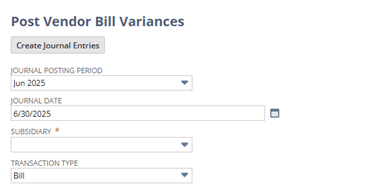
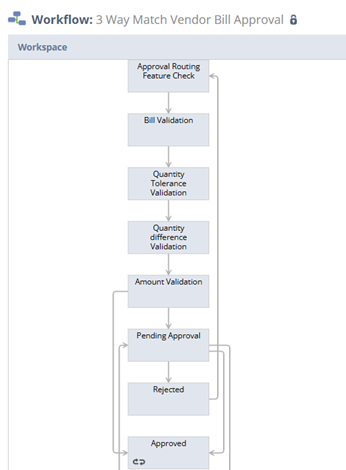
Native NetSuite processes like the 3-way match vendor bill approval workflow, and the post vendor bill variances page offer pre-built solutions to both flag variances to either correct them in real time or at month-end. However, every organization is different so the exact configuration and process will vary depending on your unique business requirements, size of your organization, and volume of transactions.
Some key items that could be missed with the native NetSuite processes:
- Post Vendor Bill Variances works to clear out the accrued purchases account, but if you don’t edit item rates on the item receipt, then your average cost may still be off.
- The native 3-way match workflow matches the bill rate with the purchase order rate – but does not compare the bill rate with the item receipt, which is what posts to inventory.
- If Bill in Advance of Receipt is enabled, then the native 3-way match workflow won’t work as expected.
Specific questions to ask yourself that will affect how you handle accrued purchases:
- Do I receive and post vendor bills before item receipts?
- Do I frequently post bills that apply to multiple purchase orders?
- Do I have international vendors, and transact in multiple currencies?
- What is my volume of purchases? Do I have audit requirements that dictate real-time analysis and reconciliations?
Some specific solutions that we have implemented for our clients that may apply to your business:
- A report that gives a daily or weekly snapshot of the balance in your accrued purchases account. This can then be used to reconcile against all open transactions to ensure that everything is posting correctly.
- Enhancements to the native 3-way match approval workflow to match vendor bill amounts to item receipt amounts. This allows you to identify and correct discrepancies in real-time and minimize postings to the cost variance account.
Other options to consider, that could help in the long term:
- AP Automation tools like NetSuite OCR (Optical Character Recognition), or one of the increasing number of 3rd parties, to leverage AI and eliminate headache and errors from manual bill entry.
- Account Reconciliation software like NetSuite Account Reconciliation Software (part of the EPM Suite) to automate and streamline account matching.
Which solution is the best fit for your organization? Meridian Business is ready and able to support you in strategy, configuration, and long-term support around accrued purchase reconciliation, whether it be for operational cash flow, year-end audits, or simple peace of mind. If you have questions or would like additional information, please reach out to your Meridian contact or email Meridian at mpower@meridianbusiness.com.