

Navigating Tariff Impacts: How NetSuite Helps You Manage Costs, Pricing, and Profitability
The subject of tariffs is dominating news. With the current tariff environment, many clients are reaching out requesting increased visibility to manage
- Real-time data for educated decision making
- Tariff impact on COGS and inventory
- Profitability and pricing adjustments
- Supply Chain disruptions
The most common questions relate to how to account for inventory costing and pricing structure. Several clients reached out for guidance, and we have worked with them in addressing tariffs with their business. This month we will explore potential options.
There are three important steps that need to be considered regarding tariffs. The first step is to include the cost of the tariff and then identify the inventory items and/or vendors which are impacted by a tariff. The second step is the revenue side to determine how the tariff costs will be included in the order to cash process. For this step, the sales price of the inventory item can be adjusted, or the tariff can be reflected as a passthrough using an “Other Charge” line item. The third and final step is implementing it with NetSuite and your business processes. Below is the solution:
Advanced Inventory – Expense Side
To address the expense side of the tariffs and if your NetSuite environment has Advanced Inventory, landed costs can be enabled as follows:
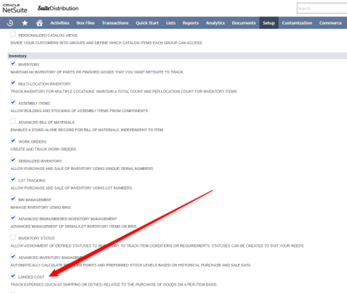
Once this feature is enabled, your company will be able to track, on a per item basis, shipping-related expenses associated with the purchase. In addition, to enabling the landed cost feature, the specific items impacted by tariffs will also need to have “Track Landed Costs” enabled as follows:
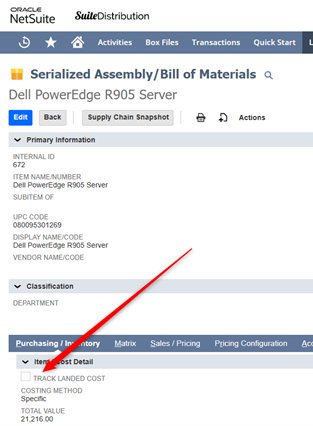
Once these two features have been enabled, the tariff costs will be addressed, and your company will be able to track the tariffs on a per item basis.
Advanced Inventory – Revenue Side
For the revenue side of tariffs, identify the items and/or vendors which are impacted by the tariffs. Once identified, the following are two potential paths. The first path relates to adjusting the sales price of the items. The adjustment can be made manually or through an import. This option is not as fluid and can be more challenging to maintain. The second option is to include the tariffs as a separate line item on the sales order. A combination of scripts and custom records can be used to make this option more fluid and easier to maintain.
Without Advanced Inventory
If your NetSuite environment does not include Advanced Inventory, then the solution becomes more customized. For both the expense side and the revenue side of the tariffs, the solution would be more client specific, but it would include scripting, custom records, and custom fields.
NetSuite Reports and Tools for Tariff Management
Capturing the dollars associated with tariffs provide the foundation for leveraging the information for profitability and cost analysis. Inventory profitability reporting identifies cost impact of tariffs on product margins. Saved Searches can be used to analyze tariff costs by category (e.g., location, supplier). For clients with NetSuite Planning and Budgeting (NSPB) models of best/worst case tariff scenarios and pricing adjustments. For clients with NetSuite Analytics Warehouse (NSAW), AI can be leveraged to track tariff trends and their impact on cost and pricing.
As tariffs potentially become a greater economic influence, they cannot be ignored. Meridian has worked with several of our clients to account and report for tariffs in their business processes. If you have questions related to tariffs and NetSuite, please reach out to your Meridian contact or email us at mpower@meridianbusiness.com.